Photo Math Solvers: What They Get Wrong, and Why You Can't Tell
Photo math solvers fail at reading, not at solving — and a misread produces flawless working on the wrong problem. What to look for, and how to photograph a problem.
Every photo maths solver does the same two things: read the problem off an image, then solve what it read. The marketing is all about the second step. Almost every failure happens in the first.
This is what actually goes wrong when a solver reads a photograph, why the failure is close to invisible when it happens, and what to look for in a tool.
The failure nobody shows you
Suppose the page says and the camera, catching the superscript beside a bracket, reads . A good solver will now produce a completely correct, carefully worked solution — to a different problem.
On the page
solve x^2 + 3x - 10 = 0What you photographed.
What it solved
solve x^23x - 10 = 0Internally consistent working, six steps, confident answer, wrong question.
Nothing in the output flags this. The only clue is that the answer looks strange — and if you knew what the answer should look like, you would not have needed the solver.
This is not a rare edge case. Handwriting recognition on maths is genuinely hard, and the characters that get confused are the ones that change an answer the most: a barred seven for a one, a fraction bar photographed at an angle for a minus sign, a subscript for a multiplication.
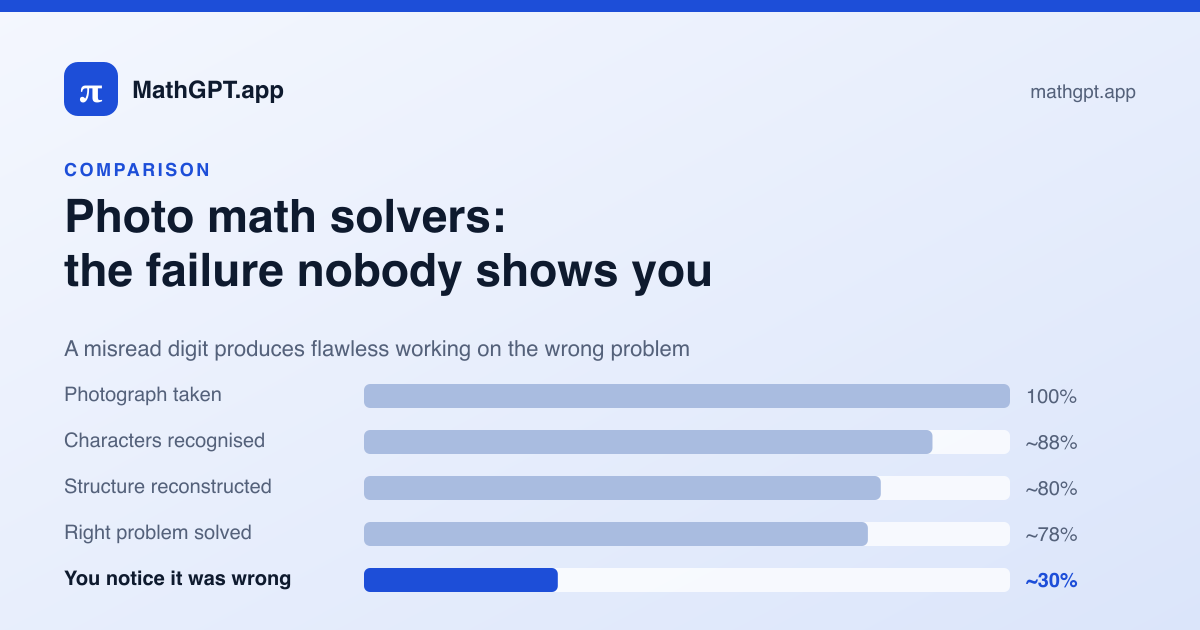
Where a photo solve actually loses accuracy
Focus, glare and angle are decided here and cannot be recovered later.
Exponents, subscripts and fraction bars are where the losses concentrate.
Knowing there is a 2 and an x is not knowing whether the 2 is a power.
A misread here produces flawless working on the wrong equation.
Only if you already had a sense of what the answer should be.
The percentages are illustrative rather than measured, but the shape is the point: the compounding happens before any mathematics starts, and the last stage is the one that decides whether the error reaches you.
What to look for in a photo solver
| Why it matters | |
|---|---|
| Shows the transcription | The single most important one. Without it a misread is undetectable. |
| Transcription is editable | Seeing it is half the fix; correcting one character instead of retyping the problem is the other half. |
| Works in a browser | A school Chromebook cannot install an app. A phone browser can open a page. |
| No account for uploads | Most solvers make photo input the paywall. Check before you need it at eleven at night. |
| Shows the full working | An answer with no steps cannot be checked, and cannot be learned from. |
| Checks its own answer | Substituting back catches the arithmetic slips that a language model is most prone to. |
| Does not keep the image | A photographed worksheet often has a name or a class in the margin. |
Getting a clean read
Most bad reads are bad photographs. In rough order of how much difference they make:
- One problem per photo. A whole worksheet gives the reader four problems to confuse with one another and none of them enough pixels.
- Camera parallel to the paper. Photographed at an angle, every horizontal bar becomes a diagonal — and a diagonal bar is how a division sign becomes a minus sign.
- Natural light, not flash. Flash blows out pencil and leaves a bright disc across the middle of the page.
- Include the instruction. "Simplify" and "solve" give different answers to the same expression, and cropping it out means the solver has to guess.
- Crop out anything personal. Names, class codes and school headers are in the margin of most worksheets.
What a photo solver is genuinely good at
None of the above is an argument against photographing problems. Typing by hand takes longer than the integral does, and every character you type is another chance to mistype it.
The argument is narrower than that: the reading step should be visible. A solver that shows you what it read has all the speed of a photo and none of the silent failure, and the cost is one glance.
That is how the photo solver here works — upload, check the transcription, fix a character if you need to, then solve. No app, no account.